

Free online tools and clear tech guides
88 fast tools for images, PDFs, text, email and networks, plus step-by-step guides for Windows, apps and AI. No signup, built for your phone.
Most used tools
The tools our visitors open most often.
Browse by category
Every tool, grouped by what it works on.
Latest articles
Fresh guides, fixes and explainers from the blog.

How to Turn Off AI Overviews in Google Search (What Actually Works)
If you want plain blue links without the AI summary at the top, you have a few options. None of them is an official...

How to Turn Off Apple Intelligence on iPhone (iOS 26 and iOS 27)
Apple Intelligence adds writing tools, notification summaries, image creation and a smarter Siri. If you do not want any of it, the steps depend...

How to Clear ChatGPT History: Delete One Chat, All Chats or Memory
Your ChatGPT history can fill up quickly, and it may hold personal or work details you would rather not keep. Clearing it takes less...

How to Turn Off or Disable Gemini on Android (2026 Guide)
If Gemini keeps popping up when you press the power button, or you simply do not want an AI assistant on your phone, you...
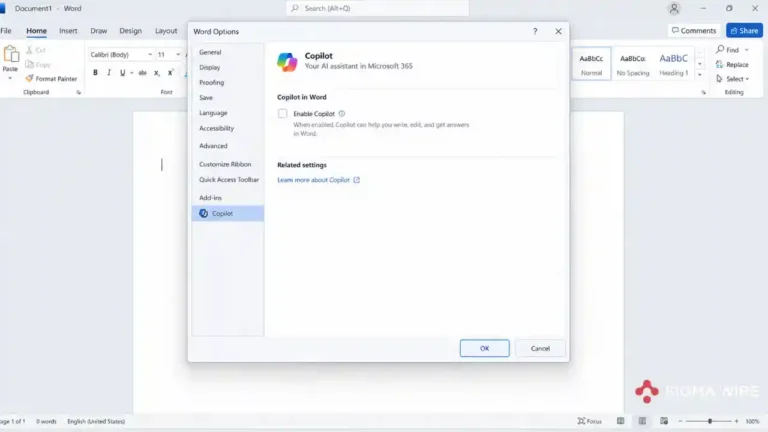
How to Turn Off Copilot in Word and Excel on Windows and Mac
Copilot can show up in Word as a button on the ribbon or a small icon next to your cursor. If you would rather...
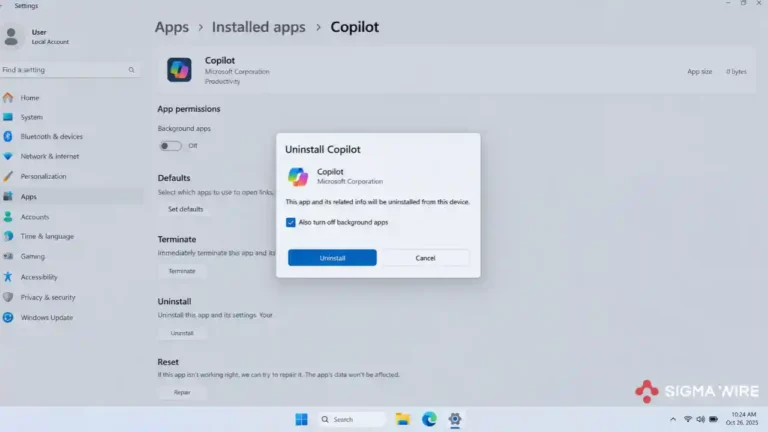
How to Disable Copilot on Windows 11: Turn It Off, Uninstall It or Remove It
Copilot shows up on the taskbar, in Edge, in Word and sometimes on a dedicated key on your keyboard. If you never use it,...

Claude Usage Limits Explained: Claude Pro 5-Hour Sessions, Weekly Caps and How to Stretch Them
Disclosure: Claude is made by Anthropic, the company this article discusses. We checked Anthropic’s own help pages and label third-party claims. If you use...
Latest tools
Recently added and rebuilt.
Why people use Sigma Wire
Small tools that do one job well.
Whatever can run in your browser does. Text, Base64 and many PDF tools never upload your file.
Each tool is a lightweight page that loads in a moment, even on a slow mobile connection.
Every layout is designed for a small screen first, then scaled up for desktops.
Open a tool and use it. No signup, no email address, no daily limit on the web tools.
What you can do on Sigma Wire
Sigma Wire brings together free web tools and practical tech writing. On the tools side you can turn an image into a shareable link with the Image to URL Converter, look up any IP address with the IP lookup tool, convert Markdown to a clean PDF, check whether an email address is real with the email validator, and work through everyday maths with the BODMAS calculator.
Developers use the online HTML, CSS and JS editor, the JSON formatter and the JWT decoder; writers use the case converter and word counter; and anyone handling documents can split, merge, compress and convert PDFs without installing software. The full list is on the All Tools page, grouped by category.
The blog explains Windows updates and error codes, Android and app features, and new AI tools in plain English, with steps you can follow on your own device.
Questions
Are the tools on Sigma Wire free?
Yes. Every tool is free to use with no account and no signup. The site is supported by advertising.
Do my files get uploaded?
Most tools, including the text, Base64, calculator and most PDF tools, run entirely in your browser and never send your input anywhere. A few tasks need a server, such as image hosting, OCR or a live email check; those tools say so on their own page.
Do the tools work on a phone?
Yes. Every page is built mobile first, so the tools work on a small screen without pinching or sideways scrolling.
What does the Sigma Wire blog cover?
Practical guides for Windows, Android, apps and AI tools: how to fix common errors, what a new update changes, and step-by-step how-tos written to be followed.
Who runs Sigma Wire?
Sigma Wire is an entity of Corenexis. Several of its tools are powered by the Corenexis API.