

Meta is making a big bet on AI, and as part of that effort, it has introduced Meta AI into its major apps — Facebook, Instagram, and WhatsApp. This chatbot assistant is powered by Meta’s Llama model and offers users smart replies, content generation, and contextual assistance.
As of the 2025 rollout, Meta AI is being integrated across Facebook, Instagram, and WhatsApp—primarily in search bars and chat interfaces. However:
Currently (as of 2025), you cannot completely disable Meta AI on any of these platforms.
What Is Meta AI?
Meta AI is an intelligent chatbot and assistant integrated into Meta platforms. It leverages Llama (Meta’s own AI language model) and provides real-time answers, writing help, search capabilities, and even image generation — right inside Facebook, Instagram, and WhatsApp.
It’s designed to reduce dependency on Google or external tools by giving users everything within the app.
Key Features of Meta AI
| Feature | Description |
|---|---|
| Smart Replies | Provides instant answers in chat-style format |
| Writing Help | Assists in writing captions, posts, and messages |
| Image Generation | Creates AI images from text prompts using the “Imagine” tool |
| Built-in Search | Answers questions without needing to Google |
| Personalized Memory | Remembers your preferences to offer tailored responses |
2025 Meta AI Updates You Should Know
Meta AI App Launch (April 2025)
Meta launched a standalone Meta AI App based on Llama 4, with enhanced personalization and a Discovery feed.
Behemoth Model Delay
Meta delayed the release of its larger, more powerful “Behemoth” AI model, initially expected in April 2025.
AI Memory Feature
Meta AI now remembers your preferences — for example, dietary habits, favorite genres, tone of writing — to personalize results.
Deep WhatsApp Integration
Meta AI is now tightly integrated with WhatsApp, allowing group interactions via “@Meta AI” mentions. However, there’s still no opt-out.
Where Can You Find Meta AI?
- Appears in Messenger as a chat thread
- Shows up in comments and posts with AI-suggested replies
- Integrated into the main search bar
- Visible in the search bar with “Ask Meta AI”
- Chat with Meta AI directly via DMs
- Suggests content and captions
- Appears when starting a new chat (Ask Meta AI button)
- Works like a chatbot assistant
- Offers quick info, summaries, and answers
Why Was Meta AI Introduced?
Meta launched this assistant to:
- Keep users engaged inside its apps
- Compete with ChatGPT, Google Bard, and other AI tools
- Create a smarter user experience with fewer external dependencies
- Promote its own Llama-based AI technology
Why Was Meta AI Introduced?
Meta launched this assistant to:
- Keep users engaged inside its apps
- Compete with ChatGPT, Google Bard, and other AI tools
- Create a smarter user experience with fewer external dependencies
- Promote its own Llama-based AI technology
Why Users Want to Disable or Mute Meta AI
Despite the benefits, many users have raised concerns:
Common Complaints
- Privacy concerns: Fear of data being used to train AI
- Annoying presence: Chat appears by default and cannot be removed
- Unnecessary tool: Users prefer old-fashioned search and chat
- Lack of control: No official way to fully opt out
- Trust issues: No transparency about how queries are stored or used
Can You Protect Your Data from Meta AI?
Yes — to some extent. Meta allows users to submit an objection if they don’t want their data used for AI training:
How to Do It:
- Go to Settings > Privacy Center
- Navigate to AI at Meta
- Click Submit an Objection Request
- Fill in your email and submit
How to turn off Meta AI on Each App
While you can’t fully disable Meta AI, you can mute or limit it on different platforms.
On Facebook:
- Open the Ask Meta AI chat
- Tap the info (“i”) icon
- Select Mute Notifications
- Choose Until I change it.
At the moment, there is no option to fully disable Meta AI on Facebook.
On Instagram:
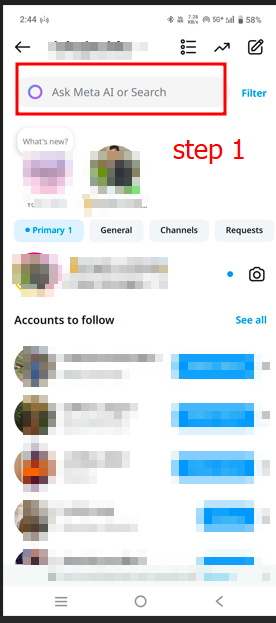
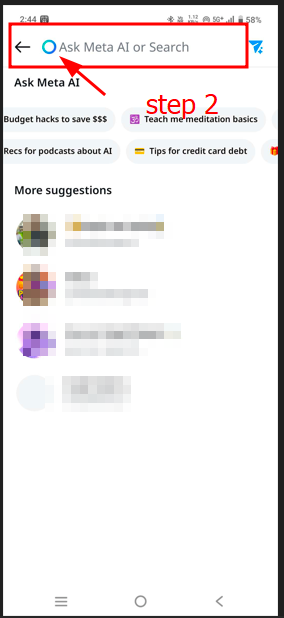
- Tap the search bar (you’ll see “Ask Meta AI”)
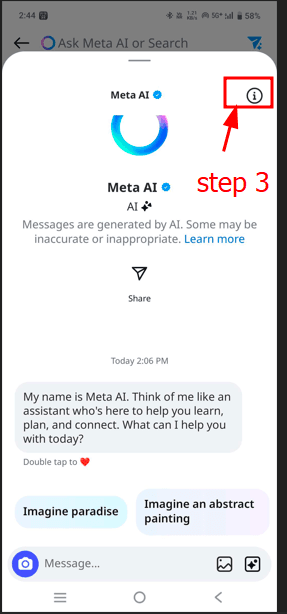
- Tap the info (“i”) icon
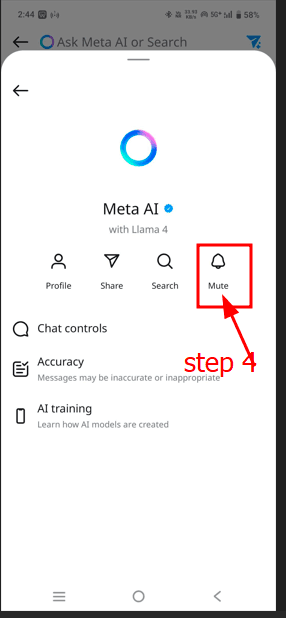
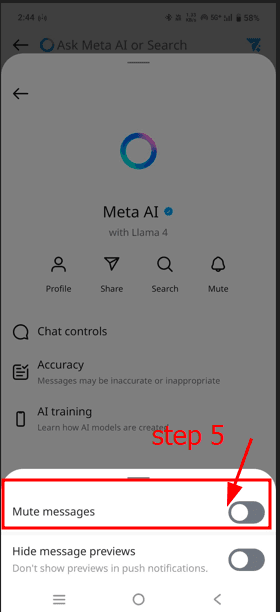
- Select Mute → choose “Until I change it”
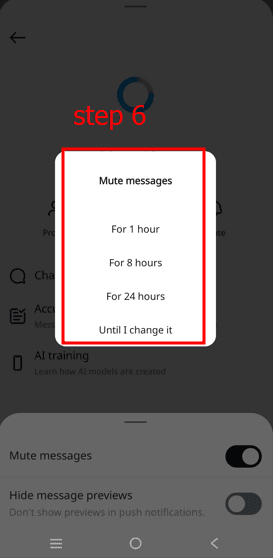
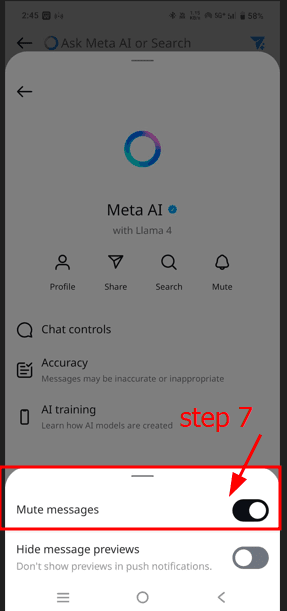
As of now, Instagram does not allow you to completely turn off Meta AI.
On WhatsApp:
- Start a new chat → Select Meta AI
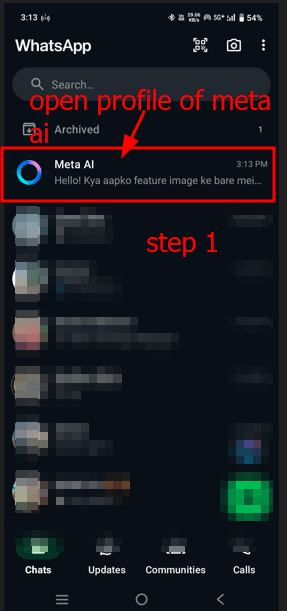
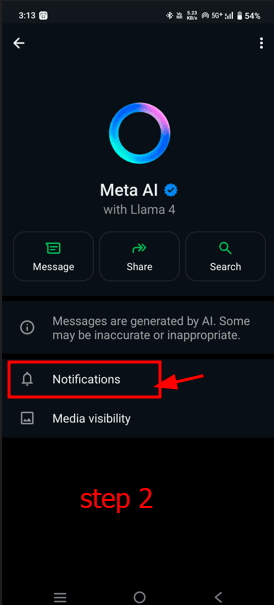
- Tap the three dots (⋮) or profile
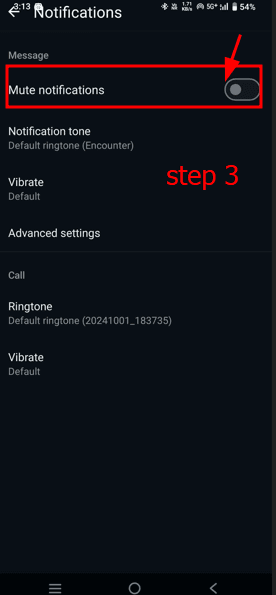
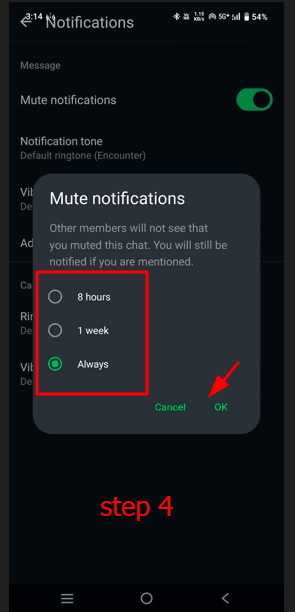
- Tap Mute → Set to Always
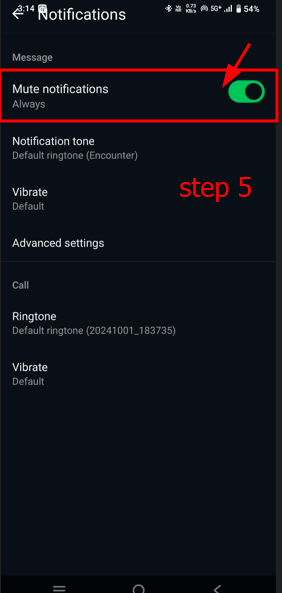
Currently, Meta AI cannot be fully disabled on WhatsApp — only muted or ignored.
How to Submit a Privacy Objection
Meta allows users to request that their data not be used to train AI models.
Steps to Object:
- Go to Settings > Privacy Center
- Scroll to AI at Meta
- Click Submit an Objection
- Fill in your name and email
- Submit the request
This doesn’t fully stop Meta AI but limits how your data is used for model training.
Conclusion
Meta AI is a powerful tool, but it’s not for everyone. Whether you’re worried about privacy, find it annoying, or just want to keep your social apps clean, muting or limiting it is your best bet for now.
We hope this guide helps you take back control of your experience. Stay updated — and always review your privacy settings.
Frequently Asked Questions
1. What is Meta AI?
u003cstrongu003eWhat does this AI assistant do?u003c/strongu003e
Meta AI is a virtual assistant integrated into Facebook,u003ca href=u0022https://sigmawire.net/picuki-your-guide-to-exploring-instagramu0022u003e Instagramu003c/au003e, and WhatsApp. It can answer questions, help with writing messages, and even generate AI images.
u003cstrongu003eIs it similar to ChatGPT?u003c/strongu003e
Yes, Meta AI works like ChatGPT and is based on large language models (Llama 3 u0026amp; Llama 4), but it is built directly into Meta’s apps.
u003cstrongu003eIs it available on all Meta apps?u003c/strongu003e
As of 2025, Meta AI is available across Facebook, Instagram, and WhatsApp.
2. How does Meta AI work on Facebook, Instagram, and WhatsApp?
u003cstrongu003eWhere does it appear?u003c/strongu003e
u003cstrongu003eFacebooku003c/strongu003e: Messenger, comment sections, and the main search baru003cbru003eu003cstrongu003eInstagramu003c/strongu003e: DMs and search baru003cbru003eu003cstrongu003eWhatsAppu003c/strongu003e: New chat screen, private chats, and even group chats using u003ccodeu003e@Meta AIu003c/codeu003e
u003cstrongu003eDoes it appear in search bars or in chats?u003c/strongu003e
Both. It shows up as “u003cstrongu003eAsk Meta AIu003c/strongu003e” in search bars and also as a chatbot inside conversations.
u003cstrongu003eDoes it send auto-replies?u003c/strongu003e
Yes, it can suggest smart replies and respond contextually to user queries.
3. How to disable or mute Meta AI?
u003cstrongu003eCan it be turned off permanently?u003c/strongu003e
No, Meta does not currently allow permanent disabling. However, users can mute it.u003cbru003eu003cstrongu003eSteps for Facebook / Instagram / WhatsApp:u003c/strongu003eu003cbru003eu003cstrongu003eFacebook:u003c/strongu003eu003cbru003eOpen Meta AI chatu003cbru003eTap the “i” iconu003cbru003eChoose “Mute Notifications” u003e “Until I change it”u003cbru003eu003cstrongu003eInstagram:u003c/strongu003eu003cbru003eTap Meta AI from the search baru003cbru003eTap the “i” iconu003cbru003eSelect “Mute” u003e “Until I change it”u003cbru003eu003cstrongu003eWhatsApp:u003c/strongu003eu003cbru003eOpen a new chat with Meta AIu003cbru003eTap profile u003e Mute u003e “Always”
4. How does Meta AI use my data?
u003cstrongu003eDoes it read my messages?u003c/strongu003e
Meta AI processes user content for better responses, and the data may be used for training purposes.
u003cstrongu003eCan I opt out of AI training with my data?u003c/strongu003e
Yes, users can request data exclusion from AI training by submitting an u0022objectionu0022 form.
u003cstrongu003eWhat is the “Objection” form?u003c/strongu003e
It’s a privacy tool that lets users request Meta not to use their data for AI model training.u003cbru003eu003cstrongu003eSteps:u003c/strongu003eu003cbru003eGo to Settings u003e Privacy Center u003e AI at Metau003cbru003eClick “Submit an Objection”u003cbru003eFill out and submit the form
5. Is Meta AI safe to use?
u003cstrongu003eWhat are the privacy concerns?u003c/strongu003e
The main concern is that Meta AI can process private messages and activity, which worries users about how their data is being used.
u003cstrongu003eCan Meta AI be trusted?u003c/strongu003e
Technically, it’s secure, but transparency is still a concern. Privacy-focused users may remain skeptical.
6. Why was Meta AI introduced?
u003cstrongu003eWhat is the real purpose?u003c/strongu003e
Meta AI is designed to increase user engagement and productivity across Meta platforms.
u003cstrongu003eIs it a competitor to Google Search or ChatGPT?u003c/strongu003e
Yes, Meta is clearly aiming to compete with AI tools like ChatGPT and Google Search, but within its own ecosystem.